| Parameter | Dimension | Units |
| Moment of Inertia |
8.0 x 10^-6 |
oz-in-s² |
| Hub Set Screw |
3-48 or 4-48 |
in. |
| Hex Wrench Size |
.050 |
in. |
| Encoder Base Plate Thickness |
.135 |
in. |
| 3 Mounting Screw Size |
0-80 |
in. |
| 2 Mounting screw size |
2-56 or 4-40 |
in. |
| 3 Screw Bolt Circle Diameter |
.823 ±.005 |
in. |
| 2 Screw Bolt Circle Diameter |
.750 ±.005 |
in. |
| Required Shaft Length |
.445 to .570* |
in. |
| With E-option |
.445 to .750* |
in. |
| With H-option |
>=.445* |
in. |
| Single-ended (S-option) Weight |
1.55 |
oz. |
| Differential (D-option, L-option) Weight |
1.83 |
oz. |
* Only for shaft diameters <.472".
** Add .125" to the required shaft length when using M-option.
Avago / Agilent / HP Direct Replacement:
US Digital's
E6 encoder may now be used as a direct replacement
for the following Avago / Agilent / HP encoders:
HEDL-6500,
HEDL-6505,
HEDL-6540,
HEDL-6545.
HEDM-6500,
HEDM-6505,
HEDM-6540,
HEDM-6545.
HEDS-6500,
HEDS-6505,
HEDS-6540,
HEDS-6545.
Notes:
- In order for the E6 to be fully compatible, CA-3921-2FT* must also be ordered separately.
*Custom cable lenths are available (standard length is 2ft).
A leads B for clockwise shaft rotation, and B leads A for counterclockwise rotation viewed from the cover/label side of the encoder (see the EM1 / HEDS page).
Be sure to keep different diameters, resolutions and options separated. The resolution of the optoelectronic modules and the code wheels must match. Index and non-index parts cannot be mixed since the optical patterns are different. An identifier is stamped on each optoelectronic module.
For Agilent Modules (HEDS):
The 2-channel (non-index) version can be identified by a 9100 or 9200. The 3-channel (index) version can be identified by a 9140. One letter specifies the resolution as shown in the table below.
For US Digital Modules (EM1):
The first number identifies the size of the disk this module is to be used with. The second number identifies the resolution as shown in the table below. The 3-channel (index) version is standard and is not denoted unless the module is non-index. The 2-channel (non-index) can be identified by a -N.
| Disk | Standard | Index |
| 64 |
- |
2-64 |
| 100 |
S |
S |
| 200 |
C |
C |
| 400 |
E |
E |
| 500 |
E |
F |
| 512 |
A |
- |
| 1000 |
B |
B |
| 1024 |
J |
J |
| 1800 |
- |
2-1800 |
| 2000 |
T |
T |
| 2048 |
U |
T |
| 2500 |
2-2500-N |
2-2500 |
Index
Provides a single pulse per revolution.
3-option
3-option makes all five of these hole diameters .125".
View option:


E-option
The E-option provides a cylindrical extention to the cover allowing for longer shafts of up to .750".
Please note: Only available for shaft diameters <.472".
View option:


H-option
The H-option adds a hole to the cover for the shaft to pass through.
- Shafts 2mm to 5mm, a .203" diameter hole is supplied.
- Shafts 6mm to 1/4", a .295" diameter hole is supplied.
- Shafts 5/16" to 10mm, a .438" diameter hole is supplied.
- Shafts 12mm to 14mm, a .594" diameter hole is supplied.
- Shafts 5/8" to 3/4", a .797" diameter hole is supplied.
- Shaft 1", a 1.047" diameter hole is supplied.
View option:


L-option
Provides Avago / Agilent / HP differential compatible pin-out. See direct replacement information above.
Please note: Only available for E6D and E6MD (10-pin versions).
M-option
This adapter plate is for mounting to a 3" diameter bolt circle. Use two 4-40 x 1/4" screws (sold separately) to attach the E6D base to the plate. Comes attached when ordered with encoder.
View option:

T-option
When mounting holes are not available, a pre-applied transfer adhesive (with peel-off backing) is available for stick-on mounting. Use the centering tool (sold separately) to slide the base into position. T-option specifies transfer adhesive on the standard mounting base.
View option:


Centering Tools (May need to order separately, only included with PKG3-packaging option).
Part #: CTOOL - (Shaft Diameter)
Description: This reusable tool provides a simple method for accurately centering the E6 base onto the shaft. It is recommended for the following situations:
- When using mounting screws smaller than 4-40.
- When the position of the mounting holes is in question.
- When using the 3-hole mounting pattern.
- When using the T-option transfer adhesive.
Instructions: When mounting encoder base, slide centering tool down shaft until it slips into centering hole of encoder base. Tighten mounting screws, then remove centering tool.
Hex Tools (May need to order separately, see below for more information).
Part #: HEXD-050 (only included with default or PKG1-packaging options).
Description: Hex driver, .050" flat-to-flat for 3-48 or 4-48 set screws.
Part #: HEXW-050 (only included with PKG2 or PKG3-packaging options).
Description: Hex wrench, .050" flat-to-flat for 3-48 or 4-48 set screws.
Spacer Tools (Do not need to order separately, included with ALL packaging options).
Part #: SPACER-265
Description: For shaft sizes <.472"
Part #: SPACER-260
Description: For shaft sizes 12MM and 1/2"
Part #: SPACER-555
Description: For shaft sizes >=.551"
Screws (For base mounting only, screws for mounting the housing to the base are already included).
Part #: SCREW-080-250-PH
Description: Pan Head, Cross Drive 0-80 UNF x 1/4"
Quantity Required for Mounting: 3 per encoder
Part #: SCREW-256-250-PH
Description: Pan Head, Cross Drive 2-56 UNC x 1/4"
Quantity Required for Mounting: 2 per encoder
Part #: SCREW-440-250-PH
Description: Pan Head, Cross Drive 4-40 UNC x 1/4"
Quantity Required for Mounting: 2 per encoder
View the PDF version of this document.
For Shafts Less Than Or Equal To 0.394" (10mm)
-
1. Base Mounting
Secure the
base to the mounting surface using two or three screws. If
a centering tool is used, slip it over the shaft and into
the center hole of the base. Tighten mounting screws.
Remove centering tool.
-
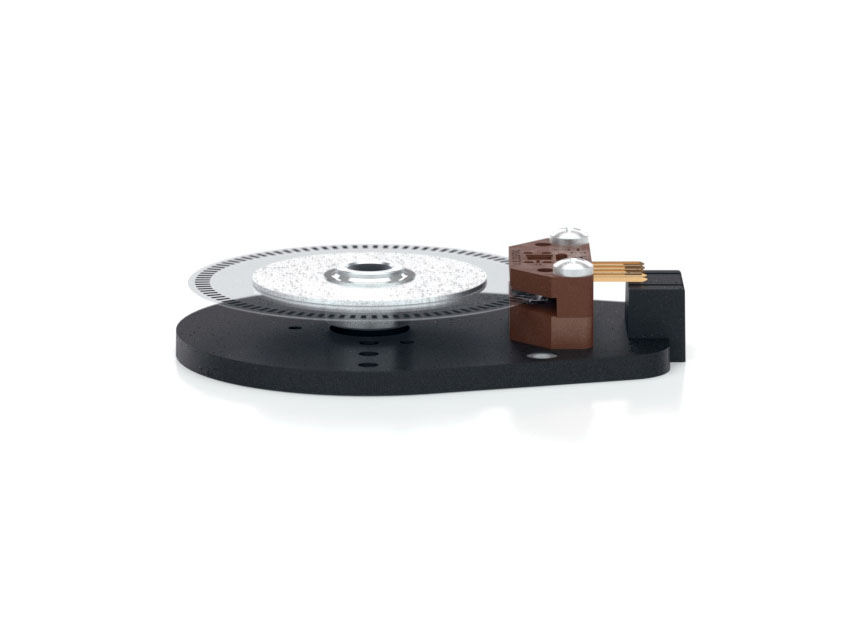
2. Spacer Installation
Place spacer tool on optic module as shown below.
-
3. Codewheel Installation
Slip codewheel over shaft with mylar disk towards top
until it bottoms out against the spacer tool. Tighten set
screw with hex wrench provided while pressing down on
hub.
-
4. Encoder Module Installation
Slip optical module into position until two alignment
pins slip into holes of module (thick side of module
towards bottom). Secure with 4-40 x 1/2" screws
(supplied).
-
5. Cover Installation
Place housing (cover) over assembly and secure with
two 4-40 x 5/8" cover screws (supplied).
For Shafts Equal to 0.394" (10mm):
-
1. Base Mounting
Secure the
base to the mounting surface using two or three screws. If
a centering tool is used, slip it over the shaft and into
the center hole of the base. Tighten mounting screws.
Remove centering tool.
-
2. Spacer Installation
Place spacer tool on optic module as shown below.
-
3. Codewheel Installation
Slip codewheel over shaft with mylar disk towards top
until it bottoms out against the spacer tool. Tighten set
screw with hex wrench provided while pressing down on
hub.
-
4. Encoder Module Installation
Slip optical module into position until two alignment
pins slip into holes of module (thick side of module
towards bottom). Secure with 4-40 x 1/2" screws
(supplied).
-
5. Cover Installation
Place housing (cover) over assembly and secure with
two 4-40 x 5/8" cover screws (supplied).
Please note:
- Shown using the Differential version
- These instructions are compatible for all versions of the E6.