Copyright © 2009 US Digital (Terms and Conditions)
- Tachometer
- Position display
- Distance display
- Digital level display
- Speed zone alarm indicator
- Cam controller
- Digital speed control
- Programmable tilt switch
| Parameter | Min. | Max. |
|---|---|---|
| Encoder Resolution (CPR) | 2 | 9999999 |
| Scale Factor | 0.000001 | 9999999 |
| Count Range | -9999999 | 9999999 |
| Display Resolution | 0.000001 |
Specifications apply over entire operating temperature range of 0 to 50C.
| Parameter | Min. | Typ. | Max. | Units |
|---|---|---|---|---|
| Supply Voltage Into ED3 | +7.5 | - | +24 (+18 rev. 2.10 and below) | Volts |
| Supply Current* With Backlight Without Backlight |
- - |
- - |
40 25 |
mA mA |
| Encoder Input Cycle Frequency | 0 | - | 1.2 | MHz |
| Relay Contact Rating*** | - | - | 2.0 | Amps |
| Relay Switching Rating**** |
- - |
- - |
125 24 |
VAC VDC |
| Relay Dielectric Strength | 500 | - | - | VAC |
| Relay Contact Resistance | - | - | 0.1 | Ohm |
| Output Voltage to Encoder** | 4.8 | 5.0 | 5.2 | VDC |
| Encoder Supply Current | - | - | 250 | mA |
| Encoder Single-ended Interface Low Input High Input |
-1.0 +2.8 |
- - |
+2.1 +7.0 |
VDC VDC |
| Encoder Differential Interface Minimum Differential Voltage Common Mode Voltage |
200 -7.0 |
- - |
- +7.0 |
mVDC VDC |
* Does not include current drawn from an external encoder.
** 100mA load.
*** At rated AC or DV voltage.
**** An external clamp diode should be used when switching inductive loads.
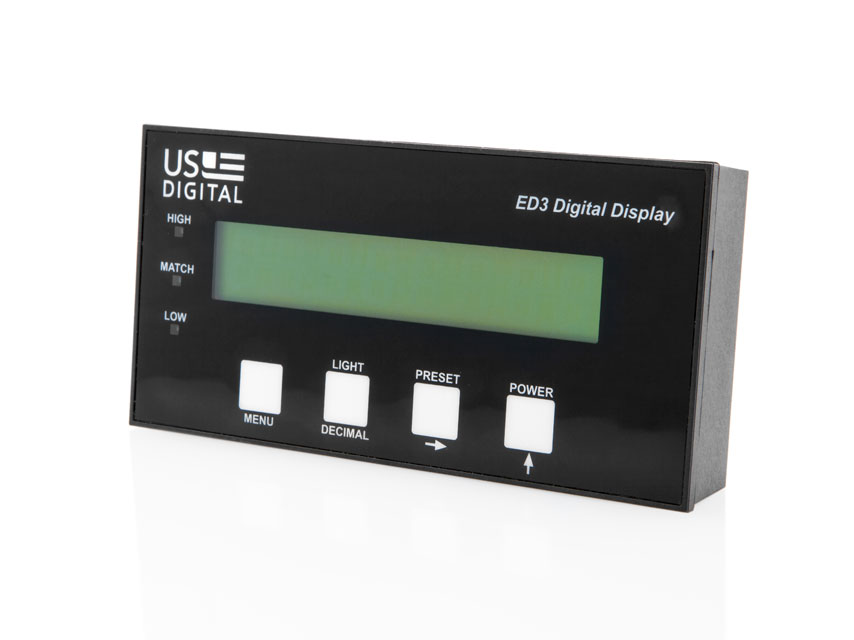
In normal operating mode, the function of each button is defined by the label located just above the button. When the ED3 first powers up, a Tachometer or Counter Mode label is briefly displayed to indicate the currently configured operating mode.
The display will flash 9999999 for numbers that are outside of the configured limits of the ED3.
In Counter Mode, the encoder index signal, if enabled, or the preset button, if enabled, can preset the display to a preload parameter value.
In Tachometer Mode, if enabled, when the preset button is pressed, the velocities at that instant will be stored as target velocities and the display is set to zero. That target will thereafter be subtracted from the current velocities to display the relative difference above and below that target. Pressing and holding the preset button for three seconds will return to the normal mode of displaying the actual velocities.
Relay:
The internal isolated SPDT relay with field programmable set points is useful for controlling external devices.
In Counter Mode, the ED3 can be configured to activate on one of four conditions: greater than, less than, window, or match count.
In Tachometer Mode, the ED3 can be configured to activate on one of three encoder velocity conditions: greater than, less than, or between.
The High LED turns on when the displayed value is greater than the Hi Set parameter.
The Low LED turns on when the displayed value is less than the Lo Set parameter.
In Counter Mode, if the relay is set to the Match condition, the Match LED turns on when the displayed value is equal to the Match parameter. If the relay is set to the Between condition, the Match LED turns on when the displayed value is between the Hi Set and Lo Set parameters.
In Tachometer Mode, if the relay is set to the Between condition, the Match LED turns on when the displayed value is between the Hi Set and Lo Set parameters.
| Counter Mode (default mode) | |
|---|---|
| Scale Factor: | 1 |
| Lo Count (Minimum Number to Display): | 0 |
| Hi Count (Maximum Number to Display): | 359 |
| = Set (Match): | 180 |
| Hi Set: | 180 |
| Lo Set: | 180 |
| Relay: | No |
| Quad (Quadrature Mode): | 1 |
| Ind (Index Enable): | Off |
| Pre (Preset Button Enable): | On |
| Preload Value: | 0 |
| Lite (Backlight Default Setting): | Off |
| Tachometer Mode | |
|---|---|
| Dis (Display Tachometer Units): | rp60 |
| CPR (Encoder Resolution): | 500 |
| Lo Set: | 1 |
| Hi Set: | 100 |
| Relay: | No |
| Quad (Quadrature Mode): | 1 |
| Abs (Absolute Value Mode): | On |
| Pre (Preset Button Enable): | On |
| Lite (Backlight Default Setting): | Off |
The operating mode and parameters may be changed by pressing and holding the Menu button for 3 seconds; this will place the ED3 into Configuration Mode. In Configuration Mode, the function of each button is defined by the text or symbol below it:
The ED3 has two sets of parameter tables, one for Counter Mode and one for Tachometer Mode. Changing the Counter Mode parameters does not affect the Tachometer Mode parameters and vice versa. Saved parameters can be either viewed or changed. Upon entering Configuration Mode, the Menu button scrolls through the two mode choices: Tach or Counter. Press the Up Arrow button to select the desired mode. The ED3 will then present the first parameter for that mode. Parameters are explained in detail in the Menu Settings section of this data sheet.
Configuration Mode may be exited at any time by pressing and holding the Menu button for three seconds. The following exit menu choices will be displayed:
Press the Up Arrow to scroll through the exit choices. Press the Menu button to execute the exit choice.
All parameters are checked when an attempt is made to save the configuration parameters. If a non-valid entry is detected, an error code (below) is displayed and must be corrected before the settings can be saved.


The internal counter values are multiplied by this factor to display numbers in more meaningful user units. A negative scale factor (minus sign in the left-most digit) will reverse the count direction. A decimal point may be placed by using the Decimal and Right Arrow buttons. Use any non-zero number.
NOTE: The Scale Factor resolution has no effect on the displayed resolution. For the PWM encoders, the Scale Factor selection is limited to +1 or -1; the sign will reverse the count direction.

The valid display range of the ED3 is set by the Lo Count and Hi Count parameters. The Lo Count defines the smallest number to be displayed. Any positive, negative, decimal, or integer number may be entered. If the displayed number attempts to go below Lo Count, the ED3 counter will rollover to the maximum number defined by Hi Count.
NOTE: Placement of the decimal point in HI Count or Lo Count controls the number of decimal digits actually displayed during operation. The HI Count or Lo Count resolution can't be set any finer than the Scale Factor resolution.

The valid display range of the ED3 is set by the Lo Count and Hi Count parameters. The Hi Count defines the largest number to be displayed. Any positive, negative, decimal, or integer number may be entered. If the displayed number attempts to go above Hi Count, the ED3 counter will rollover to the minimum number defined by Lo Count. Hi Count must be a greater number than Lo Count.
NOTE: Placement of the decimal point in HI Count or Lo Count controls the number of decimal digits displayed during operation. The HI Count or Lo Count resolution can't be set any finer than the Scale Factor resolution.

The Match LED will be lit whenever the display number matches this value. If the Relay Mode is set to = (Match), the Relay will be energized. Any positive, negative, decimal, or integer number may be entered. To disable the match condition, set =Set outside of the display range (Hi Count).

The High LED will be lit whenever the display number is greater than this value. If the Relay Mode is set to Hi, the Relay will be energized. If the Relay Mode is set to Bt (Between), the Relay will be energized and the Match LED will light when the display number is >=Lo Set and <=Hi Set. To disable this condition, set Hi Set greater than the display range (>Hi Count).

The Low LED will be lit whenever the display number is less than this value. If the Relay Mode is set to Lo, the Relay will be energized. If the Relay Mode is set to Bt (Between), the Relay will be energized and the Match LED will light when the display number is >=Lo Set and <=Hi Set. To disable this condition, set Lo Set less than the display range (< Lo Count).

The relay can be energized when the following conditions occur:

The following choices are available:
Quad 1 will cause the ED3 to count once per quadrature cycle (X1 mode). Quad 4 will cause the ED3 to count four times per quadrature cycle (X4 mode). P-Ratio will enable the device to read a PWM input. Example: If the ED3 receives 360 quadrature cycles, Quad 1 will generate 360 increments, Quad 4 will generate 1440 increments.

When an index input is asserted to a high logic level, this parameter provides the following choices:
Note: This parameter does not apply to PWM encoders.

When the Preset Button is pressed, this parameter provides the following choice:

The displayed value will be changed to this value when the preset button is enabled and asserted, or the index signal is enabled and asserted. Any positive, negative, decimal, or integer number may be entered. Be sure to enter a value >=Lo Count and <=Hi Count.

When the ED3 first powers on, the backlight will automatically be turned on if this parameter is set to On, or Off if this parameter is set to Off. This parameter does not affect the front panel backlight button. It is always enabled and will toggle the backlight on or off.

Four tachometer display units can be selected:

Enter the resolution (CPR) of the external encoder, full quadrature cycles per revolution.
This must be a positive integer value.

Set this number to 1 if the encoder to shaft ratio is 1:1, the encoder resolution has been entered, and the above units are desired. Other values can be entered for other situations such as compensation for gearing between the shaft and the encoder. The velocity is multiplied by this factor to display numbers in more meaningful user units.
A negative scale factor (minus sign in the left-most digit) will reverse the displayed velocity. If desired, a decimal point may be placed by using the Decimal and Right Arrow buttons. Use any non-zero number.
NOTE: The Scale Factor resolution has no effect on the displayed resolution.

The High LED will be lit whenever the display velocity is greater than this value. If the Relay Mode is set to Hi, the Relay will be energized. If the Relay Mode is set to Bt (Between), the Relay will be energized and the Match LED will light when the display velocity is >=Lo Set and <=Hi Set. To disable this condition, set Hi Set greater than the highest attainable velocity.
NOTE: Placement of the decimal point in HI Set or Lo Set controls the number of decimal digits displayed during operation. The HI Set or Lo Set resolution can't be set any finer than the Scale Factor resolution. Encoder CPR and requested display resolution will affect the display update time.

The Low LED will be lit whenever the display velocity is less than this value. If the Relay Mode is set to Lo, the Relay will be energized. If the Relay Mode is set to Bt (Between), the Relay will be energized and the Match LED will light when the display velocity is >=Lo Set and <=Hi Set. To disable this condition, set Lo Set less than the lowest attainable (or negative) velocity.
NOTE: Placement of the decimal point in HI Set or Lo Set controls the number of decimal digits displayed during operation. The HI Set or Lo Set resolution can't be set any finer than the Scale Factor resolution. Encoder CPR and requested display resolution will affect the display update time.

The relay can be energized when the following conditions occur:

The following choices are available:
Quad 1 will cause the ED3 to count once per quadrature cycle (X1 mode). Quad 4 will cause the ED3 to count four times per quadrature cycle (X4 mode). Example: If the ED3 receives 360 quadrature cycles, Quad 1 will generate 360 increments, Quad 4 will generate 1440 increments. In the Counts-Per-Time modes (CP1, CP60), the displayed rotational velocity in Quad 4 will be 4 times that of Quad 1; in the Revolutions-Per-Time modes (RP1, RP60), the displayed velocity will be the same for Quad 1 and Quad 4. The default and assumed value is Quad 1 for 1:1 situations.

The "Yes" selection will display all velocities as positive numbers regardless of the shaft direction. The "No" selection will display positive velocities in one direction and negative in the other.

When the preset button is pressed the velocities at that instant will be stored as target velocities and the display set to zero. That target will thereafter be subtracted from the current velocities to display the relative difference above and below that target. Pressing and holding the preset button for three seconds will return to the normal mode of displaying the actual velocities.

When the ED3 first powers on, the backlight will automatically be turned on if this parameter is set to On, or Off if this parameter is set to Off. This parameter does not affect the front panel backlight button. It is always enabled and will toggle the backlight on or off.
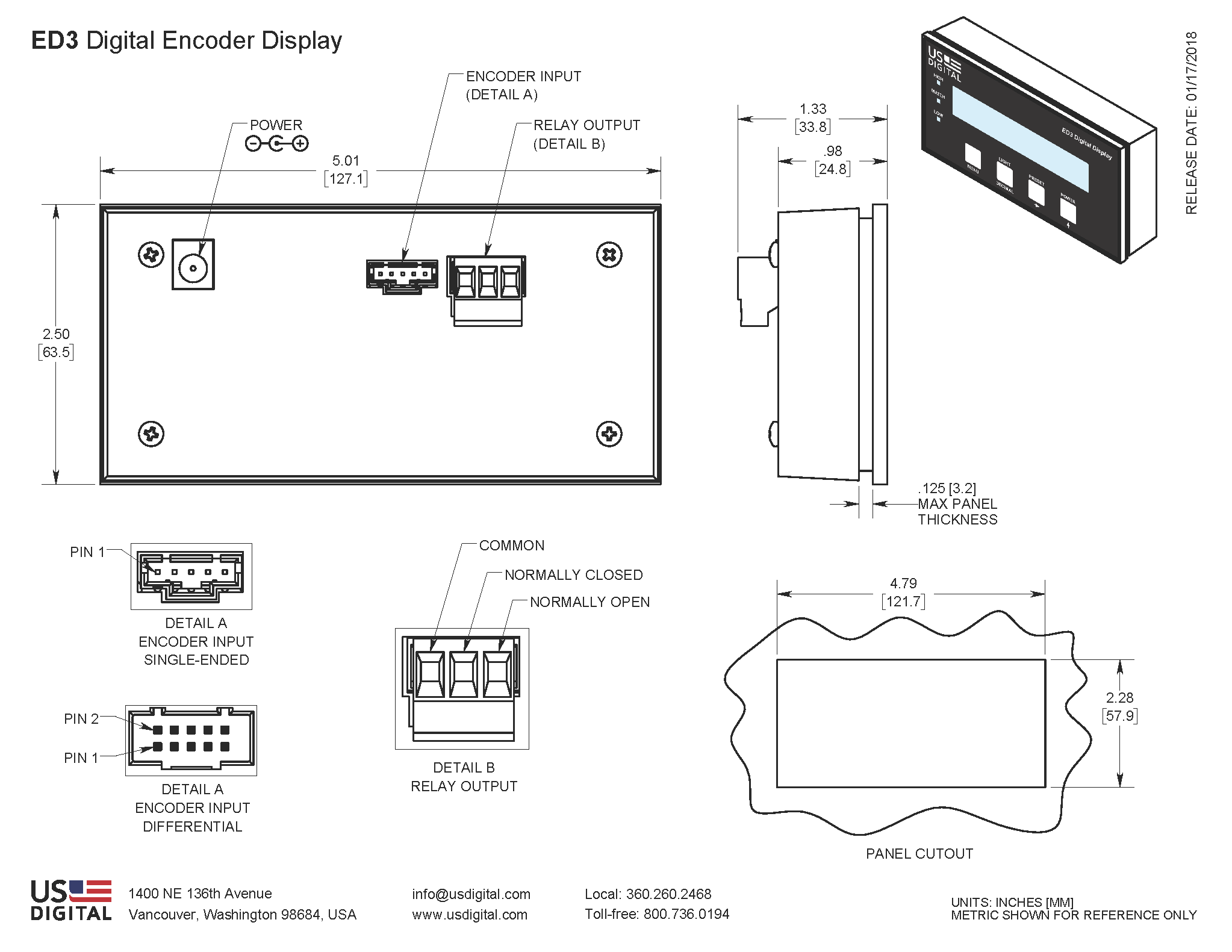
| Housing | Glass filled polycarbonate |
|---|---|
| Front Window | Lexan |
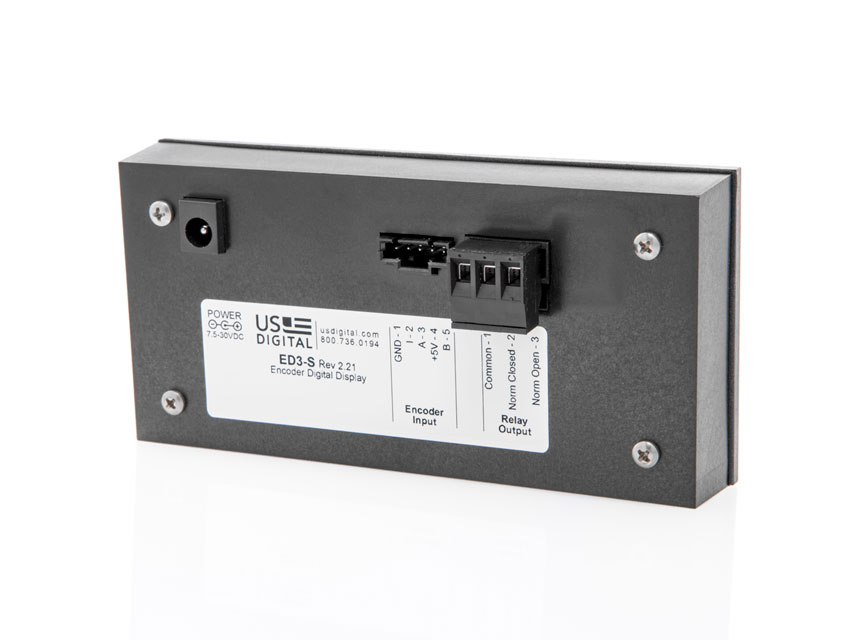
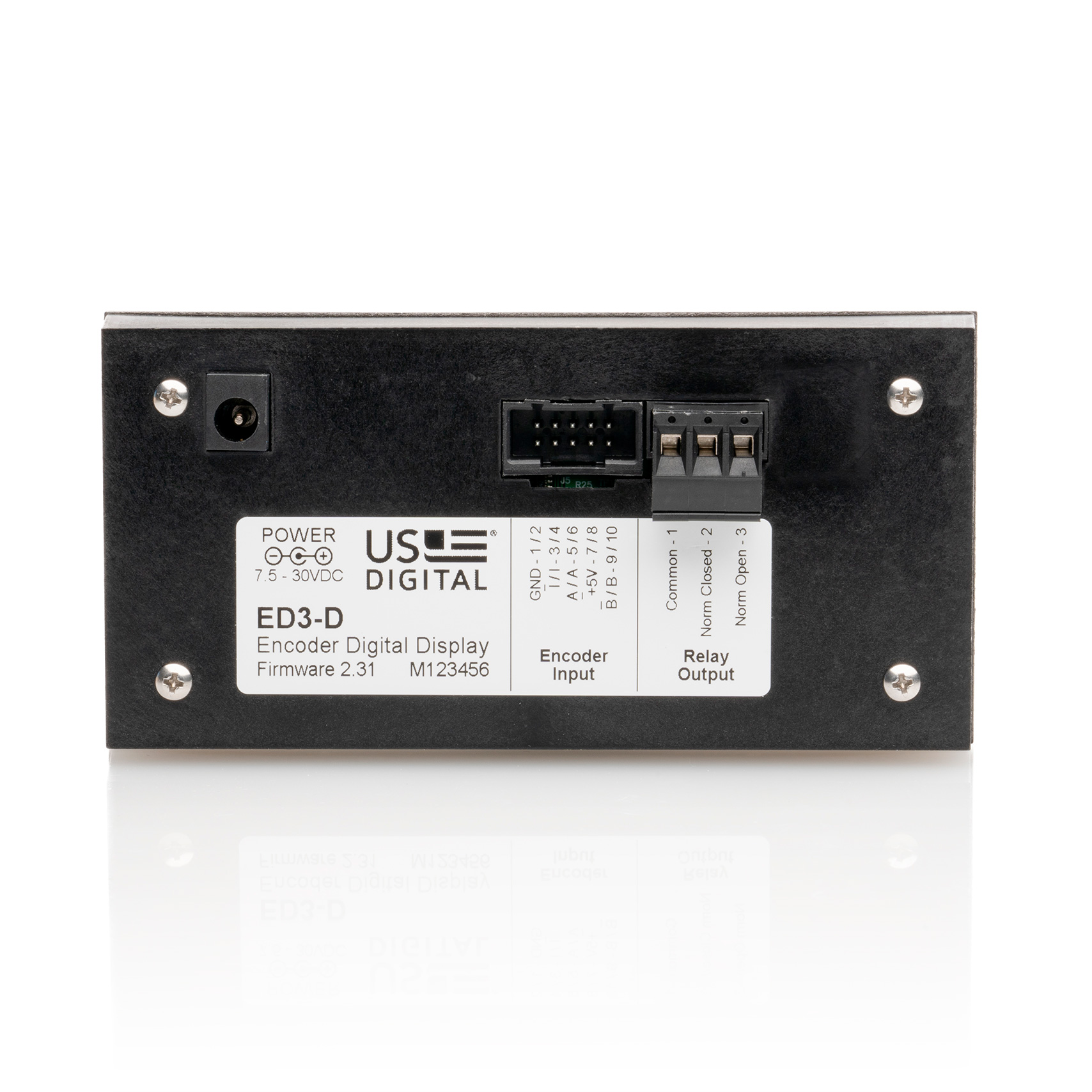
| Pin | 5-pin Single-Ended | 10-pin Differential |
|---|---|---|
| 1 | Ground | Ground |
| 2 | Index | Ground |
| 3 | A channel | Index- |
| 4 | +5VDC power | Index+ |
| 5 | B channel | A- channel |
| 6 | A+ channel | |
| 7 | +5VDC power | |
| 8 | +5VDC power | |
| 9 | B- channel | |
| 10 | B+ channel |
Quantity 1: 3-position
| J101 Finger-latching (sold separately) | ||
|---|---|---|
| 5-pin | 10-pin | Description |
| CON-FC5-22* | CON-FC10 | Connector |
| CA-FC5-W4-NC-1 | - | Connector on one end with 4 12" wires |
| CA-FC5-W5-NC-1 | - | Connector on one end with 5 12" wires |
| CA-FC5-SH-NC-6 | CA-FC10-SH-NC-6 | Connector on one end of a 6' shielded round cable |
| CA-FC5-SH-FC5-6 | CA-FC10-SH-FC10-6 | Connector on both ends of a 6' shielded round cable |
* 22 AWG is standard. 24, 26 and 28 AWG are also available.
To view the firmware version of the ED3, use the following steps:
The documents below are provided for informational purposes only.
Rev. 1.91 is no longer available and has been replaced with Rev. 2.10.
The ED3 is an LCD readout that serves as a position indicator or tachometer. The ED3 will display:
A 12VDC power supply (PS-12), that plugs directly into a 120VAC receptacle, is included with the display.
Check out our Product Alert email updates to discover our latest products, product enhancements and services. Sign up today for your chance to a win an iPod nano »
Get detailed product views of any configuration by downloading our 3D models in SolidWorks, IGES, or Parasolid format. Available on select products. See our selection »
1400 NE 136th Avenue
Vancouver, Washington 98684, USA
Monday - Thursday:
6:30am - 5:00pm PST
Friday (no shipping):
6:30am - 4:00pm PST
Copyright © 2009 US Digital (Terms and Conditions)